

SLA Enforcement on Pull Requests
SLA Enforcement helps teams gradually enforce remediation SLAs for security findings without immediately blocking all development.
When enabled, Jit evaluates the repository's target branch (usually main) for overdue code-related security findings. If overdue code findings exist and are not resolved by the pull request, Jit will either:
- Warn (the PR can still be merged), or
- Block (the PR cannot be merged)
How the policy works
When a PR is opened or updated:
- Jit runs the standard PR scan (existing behavior for new findings in the PR).
- In parallel, Jit runs the SLA policy check (if enabled):
- Looks at the current state of the target branch (
main) - Identifies open findings that exceeded the configured SLA
- Checks whether this PR resolves any of those overdue findings
- Looks at the current state of the target branch (
A finding is considered resolved by the PR only if it disappears after the PR scan.
If overdue findings exist and are not resolved:
- Warn mode → PR check passes but displays a warning
- Block mode → PR check fails and can block merging (if configured as a required check in your SCM)
Scope of evaluation (Code findings only)
SLA Enforcement applies only to code-related security findings.
The policy evaluates findings that:
- Originate from code scanning (SAST, SCA, secrets, etc.)
- Are associated with repository code
The policy does not apply to non-code related findings, such as:
- Missing approval requirements
- Required number of reviewers not met
- Workflow or branch protection configuration issues
- Other repository configuration violations
These types of findings are intentionally excluded because developers cannot directly resolve them within a pull request.
SLA Enforcement is designed to warn or block PRs only for issues that developers can actively fix in code.
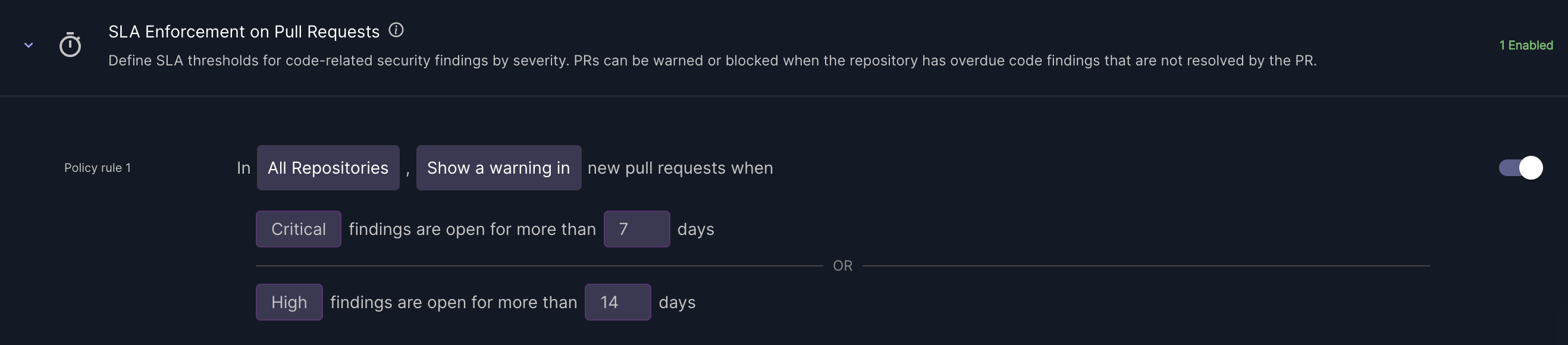
Configure the policy
Scope
Choose where the policy applies:
- All repositories, or
- Selected repositories
The policy is tenant-level and works across supported SCMs.
Enforcement mode
Choose the enforcement behavior:
- Warn - PR check passes -> warning message is shown (recommended for rollout)
- Block - PR check fails -> merging can be blocked
SLA definition
- Time-based SLA only
- Configured per severity (for example: Critical / High / Medium)
- Only open findings are evaluated
- Ignored findings are excluded
Policy conflicts (important)
Only one SLA policy may apply to any given repository.
A conflict exists when multiple SLA policies target the same repository (directly or indirectly), which could create unclear behavior (for example, one policy warns and another blocks).
Rules:
- A repository can be associated with only one active SLA policy
- Policies that target overlapping repositories are not allowed
- A repo-specific policy overrides a global (all-repos) policy
- Multiple global SLA policies are not allowed
If a conflict exists, saving the policy is blocked and the UI should show which repositories are conflicting.
PR check messages
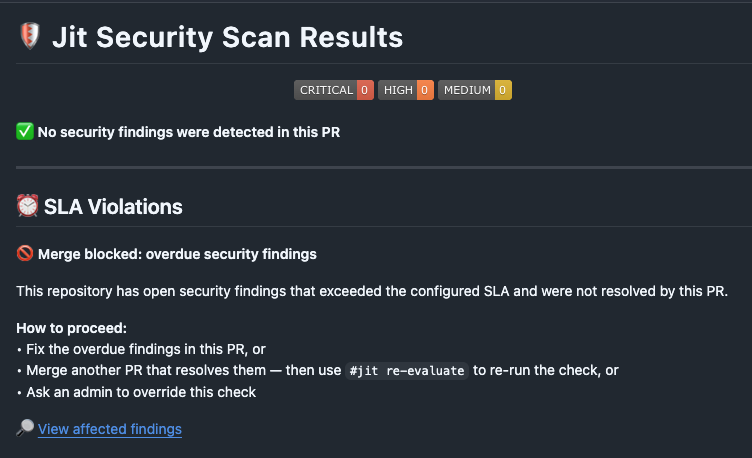
Block mode (example)
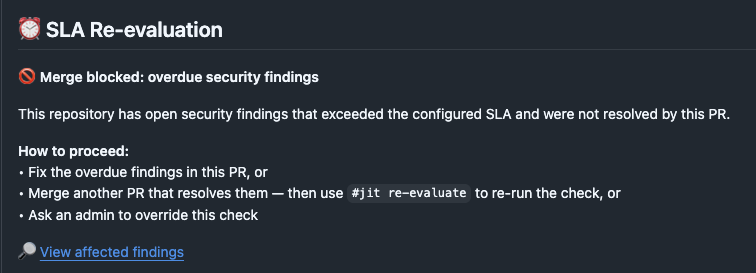
🚫 Merge blocked: overdue security findings
This repository has open security findings that exceeded the configured SLA and were not resolved by this PR.
How to proceed:
- Fix the overdue findings in this PR, or
- Merge another PR that resolves them — then use
#jit re-evaluateto re-run the check, or - Ask an admin to override this check
🔎 View affected findings → (link to Findings page filtered by this repository)
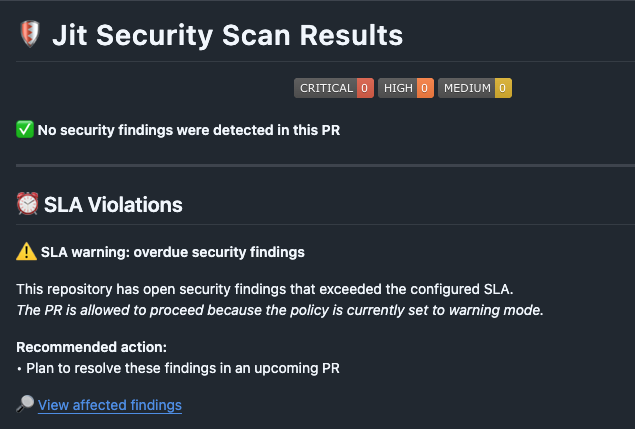
Warn mode (example)
⚠️ SLA warning: overdue security findings
This repository has open security findings that exceeded the configured SLA.
The PR is allowed to proceed because the policy is currently set to warning mode.
Recommended action:
- Plan to resolve these findings in an upcoming PR
🔎 View affected findings → (link to Findings page filtered by this repository)
Re-evaluation
The SLA policy check is evaluated against:
- The current state of the target branch (
main), and - The latest commit of the PR
Re-evaluation happens automatically when new commits are pushed to the PR.
You can also trigger re-evaluation manually, without pushing a new commit, by commenting #jit re-evaluate on the PR. This is useful when another PR has already merged and resolved the overdue findings.
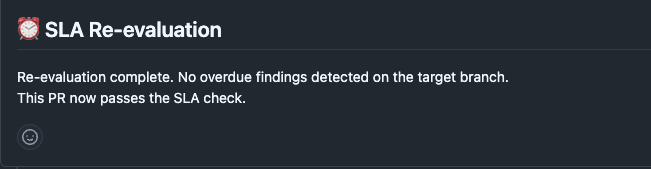
Re-evaluation results
PR passes — no more overdue findings:
PR still blocked — overdue findings remain:
Admin override
If a PR is blocked by this policy, admins can manually bypass the block (similar to bypassing new findings checks).
Updated 5 months ago